Painting with the Point & Click Tools
You use the Point & Click tool to grow regions of interest based on the standard deviation of intensity values and their connectivity. Threshold values are calculated for all pixels within the area of the selected brush in Add mode. In Remove mode, the threshold value is taken from the central point of the brush.
Point and Click tools
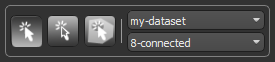
| Icon | Description | |
|---|---|---|
| Point & Click tool |

|
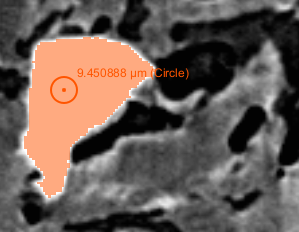
Adds or removes all connected pixels that match the selection criteria, as shown below.
|
| Point & Click Outline tool |

|
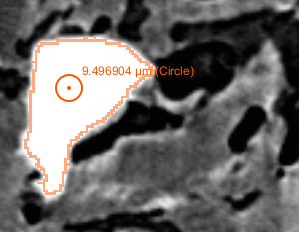
Adds or removes a contour of all connected pixels that match the selection criteria, as shown below.
|
| Point & Click Fill tool |

|
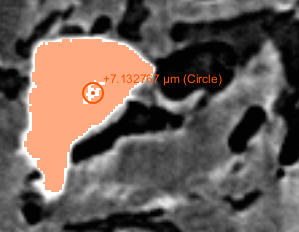
Fills enclosed areas within a region of interest based on the connectivity of unlabeled pixels or voxels (see Filling Holes with the Point & Click Fill Tool).
Note In this case, only the central point of the brush will be considered as the selection. |
| Dataset drop-down menu | - |
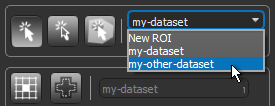
Lets you choose the dataset that will provide the values for computing the threshold. Note Available for the Point & Click and Point & Click Outline tools only. |
| Connectivity drop-down menu | - |
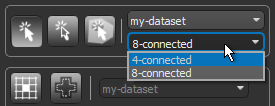
Lets you choose a level of connectivity, which determines how pixels in images are connected to their neighbors. When working with 2D images 4-connected… Propagation is done by strictly using the 4 edges adjacent to the current seed and will result in the minimum number of connected pixels (see 4-Connected and 8-Connected). 8-connected… Propagation is done by strictly using the 4 edges and 4 corners adjacent to the current seed and will result in the maximum number of connected pixels (see 4-Connected and 8-Connected). When working in multi-slice mode in 2D views or in 3D views, connectivity is selectable as follows: 6-connected… Propagation is done by strictly using the 6 faces adjacent to the current seed and will result in the minimum number of connected voxels (see 6-Connected and 26-Connected). 26-connected… Propagation is done by strictly using the 6 faces, 8 corners, and 12 edges adjacent to the current seed and will result in the maximum number of connected voxels (see 6-Connected and 26-Connected). |
 How to Paint with the Point & Click Tools
- Select the required 2D
-
- Select either the Point & Click
 tool or the Point & Click Outline
  tool.
tool. - Select the dataset that will provide the values for calculating the threshold values in the drop-down menu.
- Select the level of connectivity required in the drop-down menu.
- Increase or decrease the brush size, as required.
Note You can use the scroll wheel on your mouse to change the brush size. Brush sizes can also be set in the Brush size box.
- Do the following:
- Hold down Left Ctrl (or your configured Add with key) and then click on a representative region to add selections to the current region of interest or to the selected class of the multi-ROI.
- Hold down Left Shift (or your configured Remove with key) and then click on the current region of interest or to the selected class of the multi-ROI to remove selections.
Note Refer to Configured Actions for the Point & Click Tools for additional information about the configured actions for the Point & Click tools.
Filling Holes with the Point & Click Fill Tool
You can correct an automatic or semi-automatic segmentation with the Point & Click Fill tool. In this case, you simply need to select the required connectivity of unlabeled voxels within a region of interest and then click to label connected pixels.
- Select the required 2D
-
If you are working on a 2D view, select Single slice or Multi-slice mode, as required (see ROI Painter Tool Settings).
- Select the Point & Click Fill
 tool.
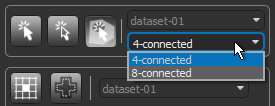
tool. - Select the level of connectivity required in the drop-down menu.
- Do the following:
- Hold down Left Ctrl (or your configured Add with key) and then click on an unlabeled pixel within the current region of interest or multi-ROI.
Note Refer to Configured Actions for the Point & Click Tools for additional information about the configured actions for the Point & Click tools.
Configured Actions for the Point & Click Tools
The configured actions for the Point & Click, Point & Click Outline, and Point & Click Fill tools are listed below.
| Action | Key | Mouse |
|---|---|---|
| Activate Point & Click add | Left Ctrl | - |
| Activate Point & Click Fill add | Left Ctrl | - |
| Activate Point & Click Outline add | Left Ctrl | |
| Activate Point & Click Outline remove | Left Shift | |
| Activate Point & Click remove | Left Shift | |
| Add to Point & Click | Left Ctrl | Left mouse |
| Add to Point & Click Fill | Left Ctrl | Left mouse |
| Add to Point & Click Outline | Left Ctrl | Left mouse |
| Decrease Point & Click brush size in Add mode (in ROI Painter) | Left Ctrl | Mouse wheel down> |
| Decrease Point & Click brush size in Remove mode (in ROI Painter) | Left Shift | Mouse wheel down |
| Decrease Point & Click Fill brush size in Add mode (in ROI Painter) | Left Ctrl | Mouse wheel down |
| Decrease Point & Click Outline brush size in Add mode (in ROI Painter) | Left Ctrl | Mouse wheel down |
| Decrease Point & Click Outline brush size in Remove mode (in ROI Painter) | Left Shift | Mouse wheel down |
| Increase Point & Click brush size in Add mode (in ROI Painter) | Left Ctrl | Mouse wheel up |
| Increase Point & Click brush size in Remove mode (in ROI Painter) | Left Shift | Mouse wheel up |
| Increase Point & Click Fill brush size in Add mode (in ROI Painter) | Left Ctrl | Mouse wheel up |
| Increase Point & Click Outline brush size in Add mode (in ROI Painter) | Left Ctrl | Mouse wheel up |
| Increase Point & Click Outline brush size in Remove mode (in ROI Painter) | Left Shift | Mouse wheel up |
| Point & Click Fill in any mode | F | Left mouse |
| Remove from Point & Click | Left Shift | Left mouse |
| Remove from Point & Click Outline | Left Shift | Left mouse |
| Switch to Point & Click Fill mode | - | - |
| Switch to Point & Click Outline mode | - | - |
| Switch to Point & Click mode> | - | - |
